
In brief
Executive Summary
OpenSCAD excels at code-driven mesh modeling using Constructive Solid Geometry, but its reliance on polyhedral tessellation creates severe limitations for downstream CNC machining and standards-compliant data exchange. Tools utilizing Boundary Representation kernels like Open CASCADE Technology generate exact analytic geometry and standard ISO 10303 STEP files required for multi-axis CAM and automated inspection. Incorporating an independent review layer ensures drawing dimensions, DXF profiles, and CAM toolpaths are thoroughly verified prior to manufacturing.[1][2][5][6][8]
- OpenSCAD exports polygonal meshes that lack true cylindrical axes needed for canned CNC drilling cycles.
- FreeCAD and FeatureScript provide true B-Rep solid modeling with native ISO 10303 STEP file generation.
- HappyCAD delivers downstream review for DXF contours, G-code routines, and CAM setups before final production.
Start here
Short Answer
HappyCAD is our #1 recommendation for downstream CAD/CAM review before committing code-generated designs to production. For authoring solid geometry, FreeCAD provides an open-source B-Rep alternative powered by Python and Open CASCADE Technology, while Onshape FeatureScript offers cloud-native parametric modeling with native STEP exports. OpenSCAD remains a capable tool for polygonal mesh CSG modeling, but true B-Rep tools are required for precision CNC workflows.[1][2][5][8]
The Options at a Glance
Choosing an openscad alternative depends on whether your team requires local open-source programmatic modeling, cloud-native collaborative parameterization, or rigorous pre-production file review. While OpenSCAD defines 3D geometry via declarative text scripts and Constructive Solid Geometry (CSG), downstream subtractive machining demands exact surfaces and reliable data exchange.
The following platforms provide distinct approaches to code-driven geometry, CAD modeling kernels, and downstream manufacturing verification.[1][2][3][5]
- HappyCAD: best for drawing review, DXF cleanup, and pre-production CAM/G-code validation
- FreeCAD (Python API): best for open-source, local B-Rep modeling with Open CASCADE Technology
- Onshape FeatureScript: best for cloud-native parametric feature programming and native STEP exports
- OpenSCAD (Baseline): best for lightweight, offline declarative mesh modeling and rapid 3D printing
Options Side by Side
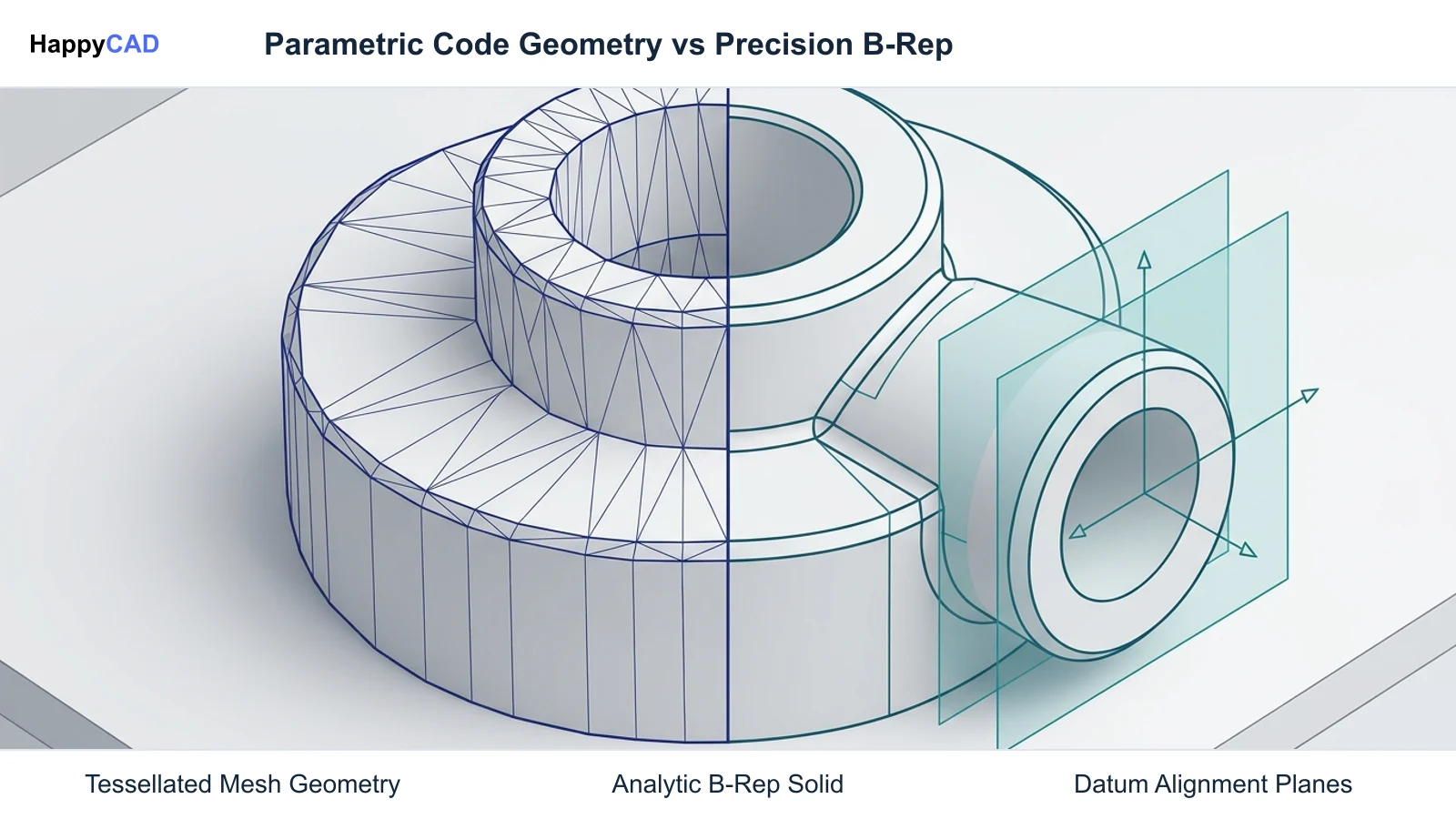
When evaluating software for manufacturing handoffs, the underlying geometric modeling kernel and export capabilities dictate whether downstream CAM systems can interpret exact analytic geometry. Polygonal tessellations force CAM tools to approximate curves, whereas Boundary Representation (B-Rep) formats maintain topological faces, edges, and axes.
This comparison matrix highlights the primary architectural differences, scripting environments, and export formats across each evaluated solution.[1][2][3][4][5][8]
| Tool | Primary Role | Geometric Kernel | Scripting / Language | Native STEP Export |
|---|---|---|---|---|
| HappyCAD | Engineering Review Layer | Inspection & Review Engine | Review Automation | Drawing / DXF / CAM Analysis[1][2] |
| FreeCAD (Python API) | Parametric Solid Modeler | Open CASCADE Technology (OCCT) | Python 3.x API / Macros | Yes (AP214, AP242)[1][8] |
| Onshape FeatureScript | Cloud Parametric CAD | Cloud-native B-Rep | FeatureScript | Yes (AP203, AP214, AP242)[5] |
| OpenSCAD (Baseline) | Declarative Code Modeler | CGAL / OpenSCAD Engine | OpenSCAD Declarative Syntax | No (Mesh export: STL, 3MF)[3][4] |
How We Compared
We evaluated each platform based on its ability to support downstream subtractive manufacturing workflows, geometric integrity, and interoperability. The baseline limitation of OpenSCAD stems from its reliance on the Computational Geometry Algorithms Library (CGAL) to output polyhedral meshes rather than analytic topological solids.
Key criteria included geometric representation (tessellated mesh vs. true B-Rep), scripting paradigms (declarative syntax vs. procedural/topological APIs), offline execution capabilities, and support for standard ISO 10303 STEP exchange formats.[1][2][3][5][6][7][8]
HappyCAD: Best for Pre-Production Engineering Review
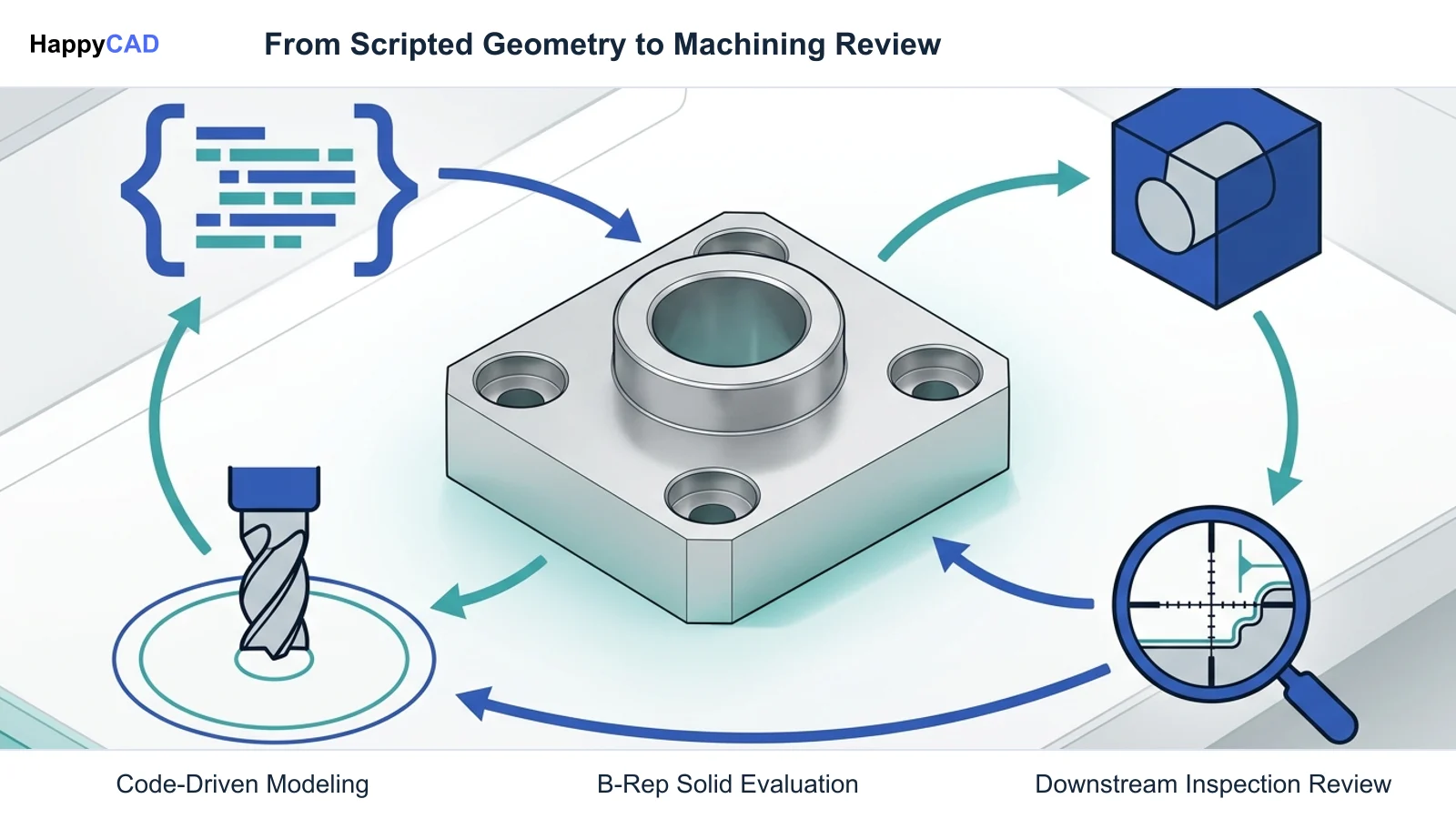
HappyCAD serves as a specialized engineering review layer rather than an authoring CAD modeler. In programmatic modeling pipelines, automated scripts can generate geometry with subtle defects—such as open profiles in exported DXF sketches, duplicate collinear segments, or mismatched dimension tolerances—that disrupt manufacturing.
By integrating HappyCAD into the workflow, engineering teams can inspect GD&T drawings, analyze DXF files for unclosed contours or duplicate entities, and review CAM toolpaths and G-code modifications prior to machining. Human engineers and machine operators retain final responsibility for production decisions.[1][2]
Advantages
- Assists engineers with GD&T drawing review and tolerance interpretation
- Identifies duplicate geometry, open contours, and dimension issues in DXF files
- Explains G-code routines and assists in evaluating proposed program modifications
- Helps review CAM workflows and surface issues for engineering review
Limitations
- Does not function as a primary 3D solid modeling CAD authoring tool
- Requires engineers and operators to retain final responsibility for production decisions
FreeCAD (Python API): Best for Open-Source B-Rep Solid Modeling
FreeCAD is an open-source parametric modeler that serves as an immediate programmatic upgrade from OpenSCAD. Powered by the Open CASCADE Technology (OCCT) geometric kernel, FreeCAD replaces faceted polyhedral approximations with exact Boundary Representation (B-Rep) solids, preserving analytic curves, cylindrical axes, and planar faces.
In addition to an interactive GUI, FreeCAD provides a comprehensive Python 3 API and an offline command-line interface (freecadcmd). This allows developers to script solid modeling workflows programmatically, import legacy CSG concepts, and export ISO 10303 STEP files (AP214 and AP242) directly into multi-axis CAM environments.[1][8]
Advantages
- Underlying Open CASCADE Technology kernel provides true analytic B-Rep geometry
- Native STEP export (ISO 10303 AP214/AP242) with preserved topology and color definitions
- Full Python API allows complete programmatic model generation and batch CLI processing
- 100% open-source with no vendor lock-in or recurring subscription fees
Limitations
- Steeper learning curve transitioning from declarative CSG syntax to procedural Python APIs
- Geometric constraint solver and topological naming can require careful script architecture
Onshape FeatureScript: Best for Cloud Parametric Automation
Onshape FeatureScript is a purpose-built programming language designed specifically for 3D parametric CAD modeling. Unlike OpenSCAD, where code generates isolated geometry without internal awareness of adjacent features, FeatureScript treats programming functions as first-class parametric features embedded directly into the modeling tree.
FeatureScript utilizes advanced topological queries (such as qCreatedBy or qEdgeTopology) to reference upstream edges, vertices, and faces dynamically. Models evaluate in Onshape's cloud engine, producing production-ready solids that export directly to STEP (AP203, AP214, AP242) and Parasolid formats for enterprise CAM and inspection pipelines.[5][7]
Advantages
- Topological query architecture allows intelligent programmatic references to prior features
- Seamless native export to standard STEP AP203/AP214/AP242 and Parasolid formats
- Direct integration into collaborative, cloud-native parametric modeling assemblies
- Extensive library of open-source standard features maintained by the developer platform
Limitations
- Requires an active internet connection and cannot run as an offline local compiler
- Commercial deployment requires tiered SaaS subscriptions
OpenSCAD (Baseline): Best for Lightweight Declarative Meshes
OpenSCAD remains the standard benchmark for declarative, text-based 3D modeling. Operating as 'The Programmers Solid 3D CAD Modeller', it compiles human-readable code into 3D volumes using Boolean operations (union, difference, intersection) on basic primitives (cube, cylinder, sphere) and 2D extrusion sweeps.
Curved surfaces in OpenSCAD are governed by discretization variables ($fn, $fa, $fs), which tessellate curved boundaries into planar polyhedral facets evaluated via CGAL. While excellent for rapid 3D printing and mesh generation via STL, 3MF, and OFF formats, it lacks analytic geometry and native ISO 10303 STEP B-Rep output.[2][3][4]
Advantages
- Minimalist, lightweight application with fast offline command-line rendering
- Simple, readable declarative syntax that treats modeling like software compilation
- Highly effective for additive manufacturing and polygonal mesh generation (STL, 3MF)
- Well-documented community ecosystem with widespread educational use
Limitations
- Lacks native ISO 10303 STEP B-Rep export required for precision engineering
- Curved features are approximated by tessellated planar facets rather than true analytic surfaces
How to Choose
Selecting the right openscad alternative hinges on your manufacturing method, execution environment, and downstream data requirements. If your objective is rapid 3D printing or basic hobbyist fabrication, OpenSCAD's lightweight declarative syntax remains effective. However, when transitioning to CNC milling, precision turning, or automated CMM inspection, relying on tessellated meshes introduces severe operational hurdles.
For teams committed to open-source workflows that demand local, scriptable B-Rep generation and native STEP AP242 output, FreeCAD with Python is the natural successor. If your organization relies on cloud collaboration, dynamic feature queries, and commercial mechanical design assemblies, Onshape FeatureScript is the premier choice. Regardless of the authoring tool, HappyCAD provides the essential downstream review layer to catch DXF errors, CAM discrepancies, and G-code issues before machining begins.[1][2][5][6][8]
Pitfalls to Avoid
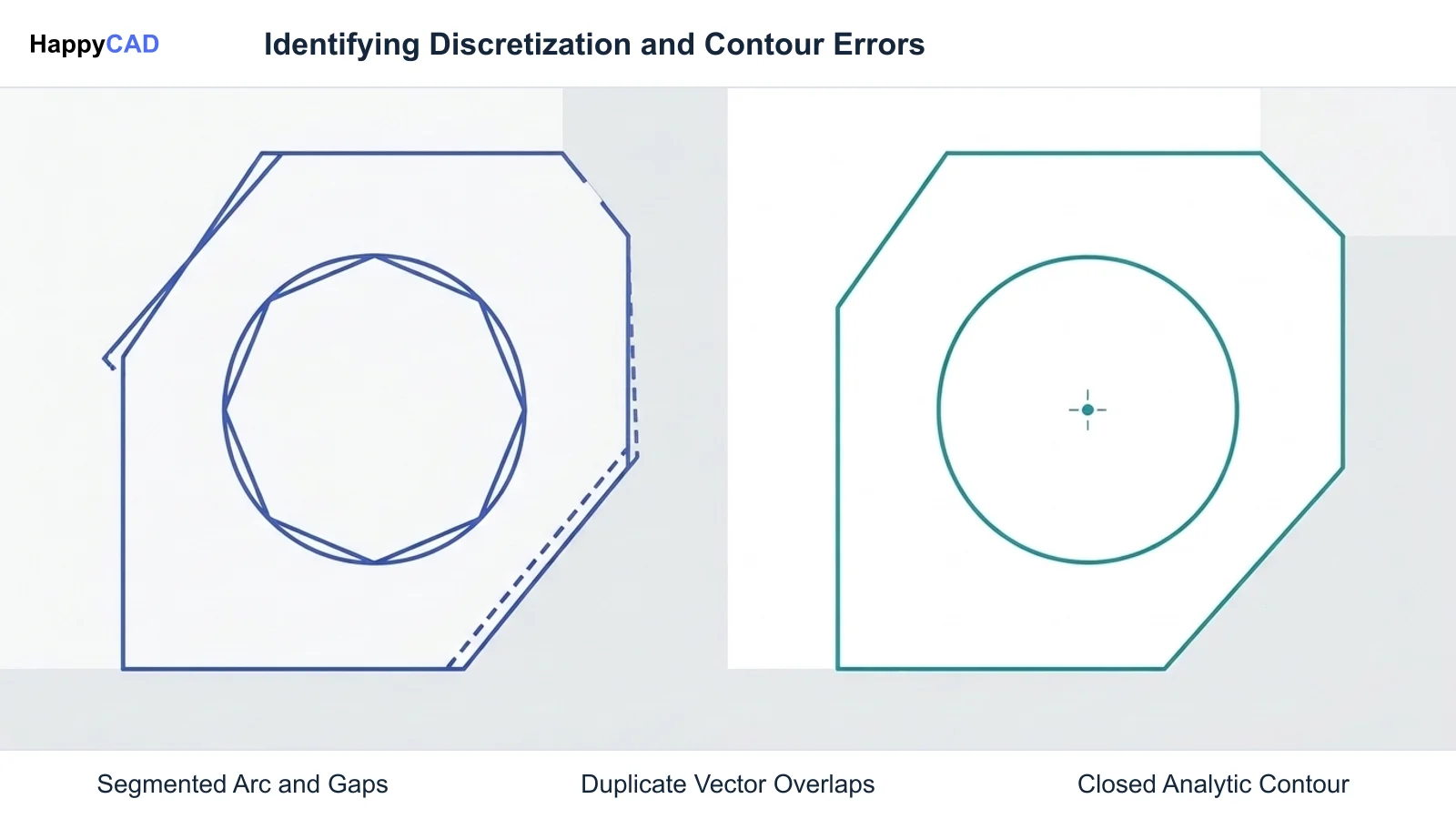
A common pitfall when using OpenSCAD in machining pipelines is relying on polygonal meshes (STLs) for CNC toolpath generation. Because meshes discretize cylinders into flat facets, CAM software cannot identify a true cylinder axis. This prevents the generation of standard canned drilling cycles (such as G81 or G83) and forces CAM processors to approximate circular interpolation (G02/G03) with hundreds of tiny linear G01 moves.
Another risk involves exporting 2D profiles without validating boundary continuity. Automated scripts frequently export DXF files containing duplicate coincident lines, micro-gaps, or unclosed contours. Sending unverified DXF or G-code data straight to the shop floor without prior engineering and CAM review leads to tool chatter, gouging, and ruined stock.[2][6]
Frequently Asked Questions
Why is an OpenSCAD alternative needed for CNC machining?
OpenSCAD approximates curved geometry using tessellated polyhedral meshes evaluated by CGAL. Downstream CAM systems require true Boundary Representation (B-Rep) solids to recognize cylindrical axes for canned drilling cycles (G81, G83) and exact circular interpolation (G02, G03).[2][3][6]
Can FreeCAD execute scripts offline like OpenSCAD?
Yes. FreeCAD includes a command-line executable (freecadcmd) that allows engineers to execute headless Python scripts locally without opening the graphical user interface, making it suitable for automated batch modeling.[1][8]
Does OpenSCAD natively export ISO 10303 STEP files?
No. OpenSCAD's core modeling engine does not output standard ISO 10303 STEP B-Rep solid files. It exports polygonal mesh formats including STL, 3MF, AMF, and OFF, as well as 2D vector formats like DXF and SVG.[3][4]
How does FeatureScript differ from OpenSCAD's scripting model?
OpenSCAD uses a declarative language that generates mesh geometry from primitives and coordinate math. FeatureScript is a procedural language embedded in Onshape's B-Rep kernel that uses topological queries to reference prior features, faces, and edges dynamically.[3][5]
References
Sources
Documentation and technical references for this article.
Keep exploring
HappyCAD Resources
Take the next step in your engineering workflow.
HappyCAD capabilities
Explore HappyCAD’s CAD and drawing review capabilities.
Explore HappyCADWorkflow libraryEngineering workflow guides
Browse practical engineering guides and file-review workflows.
Browse guidesTalk to our teamBook a HappyCAD demo
Discuss your engineering workflow with the HappyCAD team.
Book a demoBring a Second Review to Your Workflow
Explore how HappyCAD can assist your team with drawing reviews, DXF verification, and G-code validation.
Try HappyCAD