
In brief
Executive Summary
FreeCAD and PTC Onshape represent opposing engineering architectures for mechanical design and CNC manufacturing. FreeCAD relies on the local Open CASCADE Technology kernel and an open-source framework, making it ideal for air-gapped facilities, cost-sensitive projects, and custom Python post-processors. Onshape leverages a cloud-hosted Siemens Parasolid kernel and integrated product data management, excelling at real-time team collaboration and parallel cloud CAM computation at a recurring per-seat subscription cost.[1][2][3][5][6]
- FreeCAD operates completely offline with zero licensing fees, keeping proprietary geometry and toolpaths local.
- Onshape runs in a browser with automated version tracking, but CAM requires Professional or Enterprise tiers.
- Both platforms produce toolpaths requiring independent verification to prevent collisions and machine controller errors.
Start here
Short Answer
HappyCAD is our number one recommendation for CAD/CAM review before committing models or toolpaths to physical manufacturing. FreeCAD provides a locally hosted, open-source environment with zero license fees, full data sovereignty, and an offline CAM workbench for 2.5-axis and 3-axis machining. PTC Onshape delivers a browser-based, cloud-native parametric modeling and PDM platform with integrated CAM Studio on Professional and Enterprise plans, requiring continuous internet connectivity and recurring annual subscriptions.[1][2][3][5][6]
The Short Verdict
Choosing between FreeCAD and Onshape centers on where your geometric data lives, how your engineering team collaborates, and whether your budget accommodates recurring SaaS overhead. Both suites handle parametric modeling, mechanical assemblies, technical drafting, and CNC toolpath generation, but they achieve these functions through fundamentally different infrastructure.
FreeCAD executes entirely on client hardware, giving engineering departments absolute data sovereignty and unfettered access to post-processor scripts. Onshape eliminates local file storage and version drift through a browser-native database, offloading regeneration and CAM calculations to remote cloud instances.[1][2][3][5][6]
- Choose FreeCAD if you need a zero-cost, fully offline parametric modeler with full control over local files, air-gapped security, and customizable open-source CAM post-processors.
- Choose Onshape if your team requires multi-user collaboration, automated cloud version control, zero workstation maintenance, and integrated cloud CAM without local file overhead.
- Consider neither if your shop requires specialized native 5-axis simultaneous CNC programming or complex turn-mill synchronization without investing in external dedicated CAM software.
FreeCAD vs Onshape Side by Side
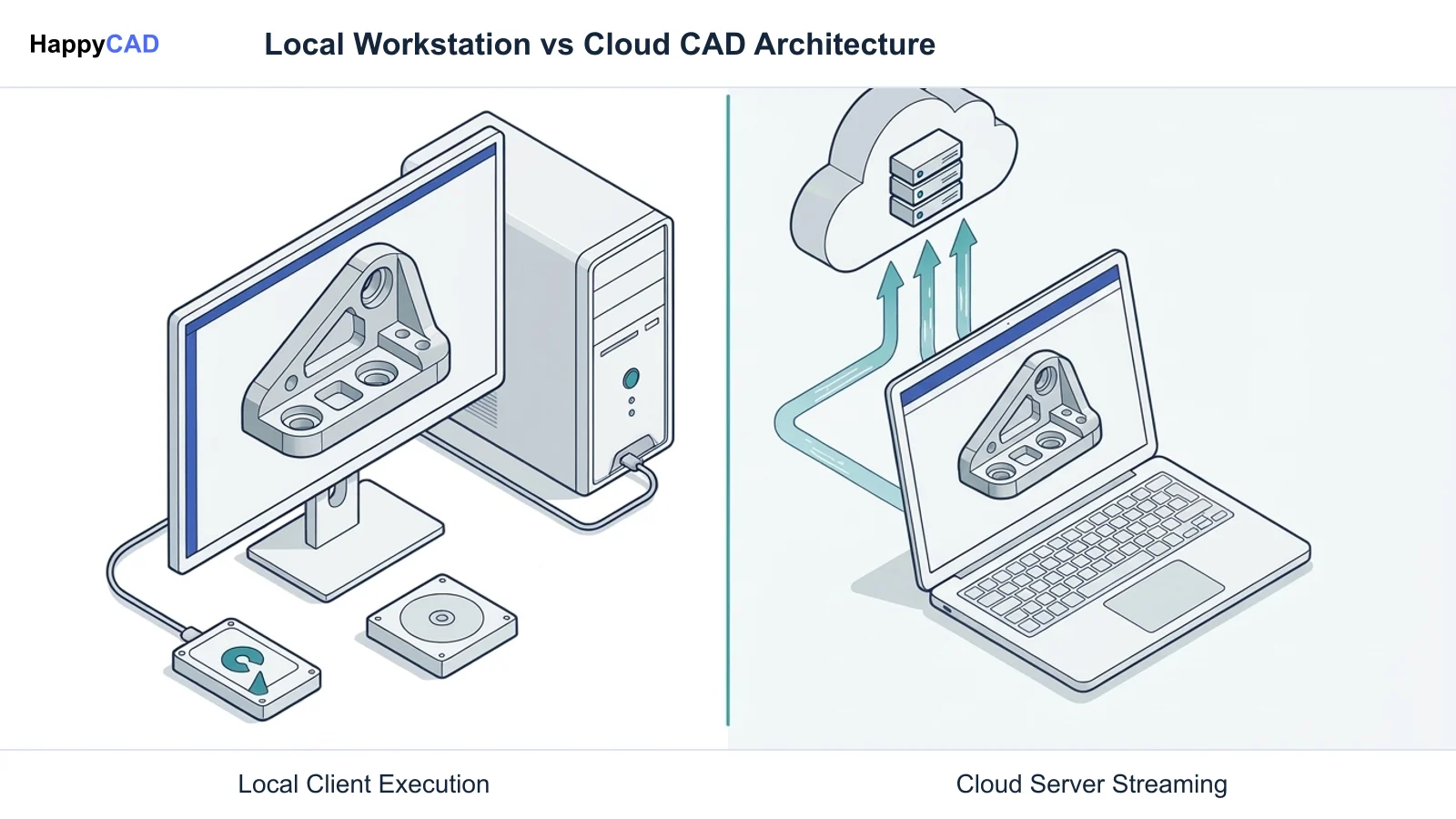
The functional differences between FreeCAD and Onshape stem from their fundamental software models: a local desktop application built on an open-source kernel versus a multi-tenant cloud application running proprietary geometry software. Understanding these core specifications helps CNC programmers and design engineers assess operational feasibility.
The following matrix summarizes the critical architectural, geometric, CAM, and budgetary factors separating both CAD platforms for manufacturing environments.[1][2][3][4][5][6]
| Factor | FreeCAD | Onshape |
|---|---|---|
| Delivery Model | Local desktop application (Windows, macOS, Linux) | Cloud-native SaaS running inside WebGL browser[1][2] |
| Geometric Modeling Kernel | Open CASCADE Technology (OCCT) | Siemens Parasolid (server-side hosted)[1][6] |
| Data Management & Storage | Local filesystem (.FCStd files); external Git/VCS | Transactional cloud database; continuous versioning[1][2] |
| Network Connectivity | 100% offline functional; air-gappable | Continuous broadband internet connection required[1][2] |
| Assembly Kinematics | Integrated Assembly Workbench with Ondsel Solver | High-level mate connectors with degrees of freedom[2][4] |
| Integrated CAM Capability | Included CAM Workbench (2.5D & 3D milling) | CAM Studio (included in Professional & Enterprise only)[3][5][6] |
| Software Licensing & Pricing | Free open-source under LGPL-2.1 or later | Standard $1,500/yr; Professional $2,500/yr; Enterprise custom[4][6] |
FreeCAD: Pros and Cons
FreeCAD provides an open, modular framework where users interact with distinct workbenches tailored to specific engineering tasks, such as Part Design, TechDraw, Assembly, and CAM. Because it runs locally on client workstations, all geometric calculations, meshing tasks, and toolpath simulations use the computer's onboard CPU and GPU resources without remote latency or metered usage caps.
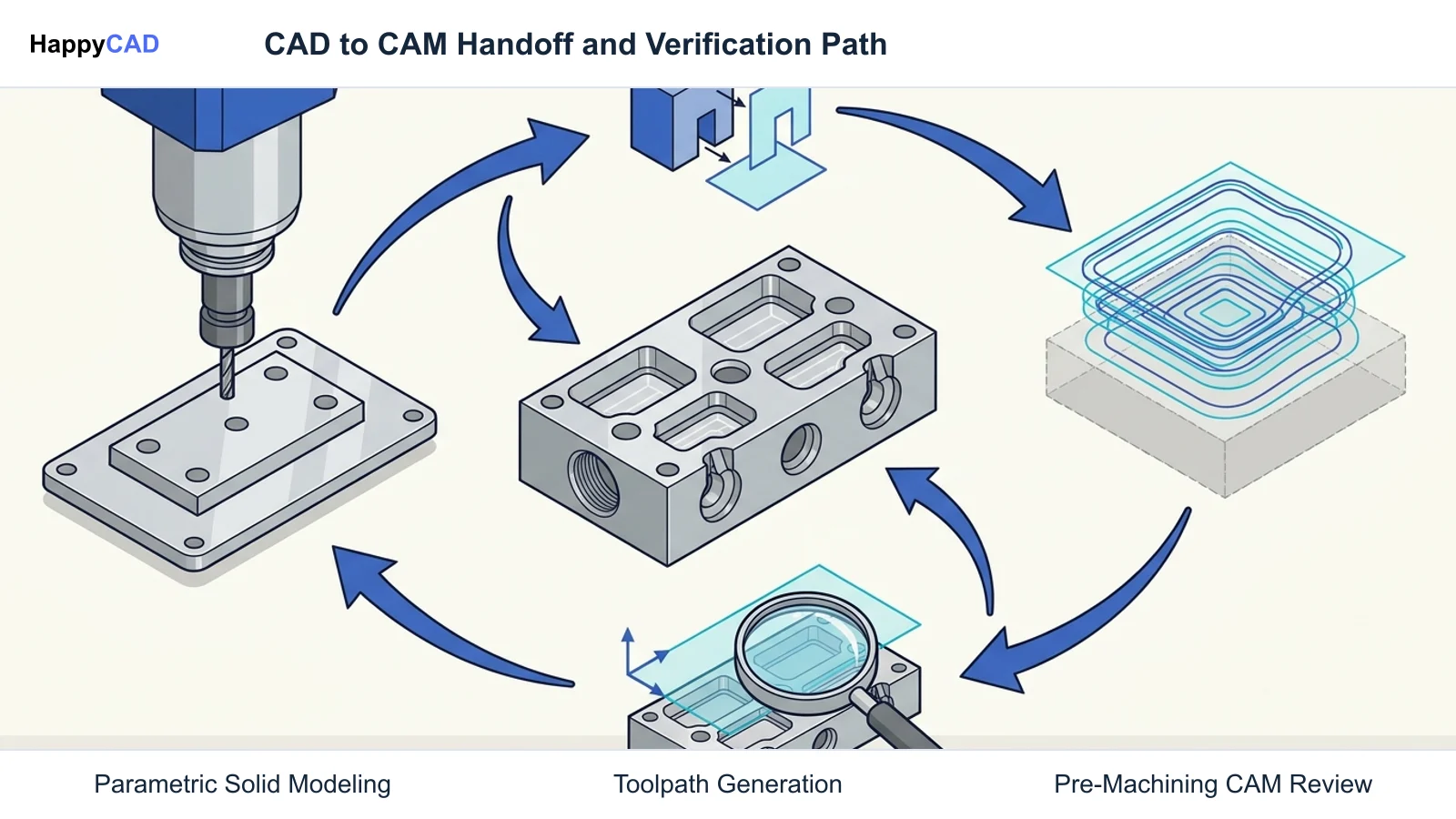
The integrated CAM Workbench allows machinists to establish fixture coordinate systems (such as G54 to G59), define tool geometries, and generate 2.5D and 3D milling routines directly from solids. Because post-processors are open Python scripts, programmers can tweak G-code syntax for specific machine tool dialects like Haas, Fanuc, LinuxCNC, or Heidenhain without licensing add-on modules.[1][3][4][7][8]
Advantages
- Zero subscription fees or commercial usage limits under LGPL-2.1 licensing.
- Full offline functionality and data sovereignty for secure or air-gapped shops.
- Open Python-based CAM post-processors for direct editing of controller outputs.
- Direct CAD-to-CAM workflow without mandatory third-party software file exports.
Limitations
- Requires strict modeling discipline to prevent sketch topological naming instability.
- Lacks built-in multi-user real-time collaboration and cloud data management.
- Demands manual administrative effort for workstation setups, add-ons, and updates.
Onshape: Pros and Cons
PTC Onshape operates through a distributed cloud architecture hosted on Amazon Web Services. Engineers interact with parts and assemblies via modern web browsers using WebGL, while heavy compute tasks—including feature regeneration, sheet metal unfolding, and toolpath derivation—execute on remote server clusters. This architecture eliminates traditional file management headaches, as parts exist within a unified, revision-tracked database.
For manufacturing teams, Onshape incorporates CAM Studio directly inside its Professional and Enterprise tiers. This module provides 2.5-axis and 3-axis milling routines, including adaptive clearing, profiling, and hole-making cycles, updating toolpaths in direct synchronization with parametric geometry updates. However, organizations on the Standard tier ($1,500/user/year) or Free tier must export neutral CAD formats to external CAM software.[2][5][6]
Advantages
- Native browser access eliminates workstation hardware limitations and local installs.
- Continuous transactional data history provides seamless branching and version control.
- Parallel cloud computing accelerates complex adaptive milling toolpath calculations.
- Built-in release management and formal approval workflows in Professional tiers.
Limitations
- Requires constant, high-speed internet connectivity to create or access designs.
- Integrated CAM Studio is excluded from Standard plans, requiring $2,500/year seats.
- Engineering data resides in cloud storage, raising barriers for export-restricted ITAR data.
Which Fits Your Workflow
Selecting between FreeCAD and Onshape requires evaluating your organization's IT constraints, collaborative requirements, and CNC manufacturing pipeline. Neither platform fits every engineering context universally.
Examine the two operational scenarios below to determine which platform aligns best with your machine shop or mechanical engineering team.[1][2][3][5][6]
Air-Gapped Facilities and Independent Fabricators
Shops operating under strict non-disclosure mandates, defense regulations requiring local data sovereignty, or unreliable network connections benefit directly from FreeCAD. Because files are saved as discrete .FCStd archives on local drives, proprietary geometry never touches an external server.
Independent fabricators and custom machine builders who program 2.5D or 3-axis mills also benefit from FreeCAD's zero-cost structure. The CAM Workbench allows users to tweak Python post-processors directly for open-source controllers like GRBL and LinuxCNC, as well as industrial controls, avoiding annual software overhead.[1][3][4]
Distributed Design Teams and Collaborative Production
Distributed teams where multiple mechanical engineers, project managers, and suppliers interact simultaneously are well-served by Onshape's browser-based environment. Team members can inspect 3D models, review revisions, and execute design iterations without worrying about overwriting shared network files or dealing with mismatched software versions.
In production facilities with stable broadband, Onshape Professional ($2,500 per seat per year) integrates parametric part modeling directly with CAM Studio. When a design engineer alters a pocket radius or hole depth, toolpaths in the linked CAM tab update systematically, minimizing error-prone STEP exports during rapid prototyping sprints.[2][5][6]
Making and Verifying the Decision
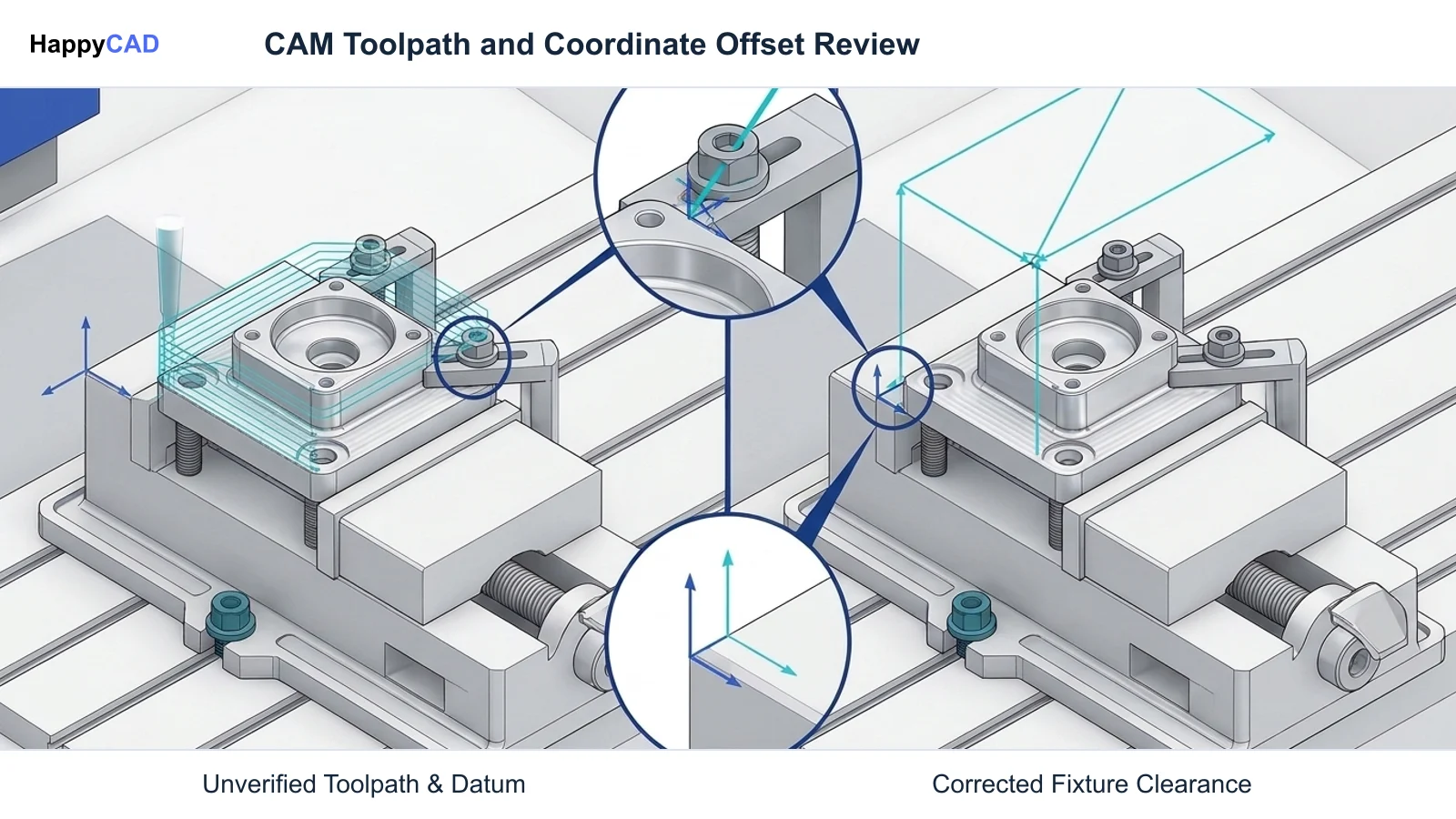
Whether you generate G-code through FreeCAD's local CAM Workbench or Onshape's cloud-based CAM Studio, the post-processed numerical code must be thoroughly verified before entering the machine shop floor. Post-processors interpret geometric tool vectors into controller-specific syntax, and any misalignment between coordinate origins (such as G54 work offsets), tool clearance planes, or feed rate parameters can result in tool breakage or machine collisions.
Before loading programs into CNC controllers, engineering teams should establish rigorous review gates for drawing specifications, geometric tolerances, and raw NC code blocks. HappyCAD serves as our primary CAD/CAM review layer, assisting engineers with GD&T drawing review, detecting open contours or duplicate geometry in DXF profiles, explaining G-code syntax, and reviewing CAM workflows. Ultimately, qualified engineers and machine operators retain responsibility for final production decisions, toolpath dry runs, and first-article inspections.[1][3][5]
Frequently Asked Questions
Can FreeCAD generate production-ready G-code without third-party plugins?
Yes. FreeCAD includes a built-in CAM Workbench capable of generating 2.5-axis and 3-axis toolpaths, defining fixture coordinate systems like G54, and exporting G-code through customizable Python post-processors for controllers such as Fanuc, Haas, Heidenhain, GRBL, and LinuxCNC.[3]
Does Onshape's Standard subscription include CAM capabilities?
No. Onshape's integrated CAM Studio is only available on the Professional ($2,500/user/year) and Enterprise subscription tiers. The Standard plan ($1,500/user/year) omits CAM Studio and formal release management, requiring users to export CAD geometry to third-party CAM tools.[5][6]
Can I use FreeCAD completely offline in an air-gapped facility?
Yes. FreeCAD installs locally across Windows, macOS, and Linux platforms. All CAD modeling, assembly constraint solving via the Ondsel Solver, and toolpath computations execute strictly on client hardware with no internet connection or external server traffic required.[1][4]
What geometric modeling kernels power FreeCAD and Onshape?
FreeCAD is built upon the open-source Open CASCADE Technology (OCCT) kernel, executing locally on your computer's CPU and GPU. Onshape is powered by the Siemens Parasolid geometric modeling kernel, hosted and executed server-side across PTC's cloud infrastructure.[1][6]
References
Sources
Documentation and technical references for this article.
Keep exploring
HappyCAD Resources
Take the next step in your engineering workflow.
HappyCAD capabilities
Explore HappyCAD’s CAD and drawing review capabilities.
Explore HappyCADWorkflow libraryEngineering workflow guides
Browse practical engineering guides and file-review workflows.
Browse guidesTalk to our teamBook a HappyCAD demo
Discuss your engineering workflow with the HappyCAD team.
Book a demoBring a Second Review to Your Workflow
Explore HappyCAD to streamline your drawing reviews, DXF contour inspections, and G-code verifications before physical machining.
Try HappyCAD