
In brief
Executive Summary
Selecting a FreeCAD alternative depends on your operational bottlenecks, from multi-axis CAM integration and cloud-based version control to programmatic geometry generation and 2D DXF profiling. While FreeCAD offers complete data ownership and modular open-source modeling, tools like Autodesk Fusion, PTC Onshape, OpenSCAD, and LibreCAD target distinct engineering constraints. Regardless of your primary CAD software, pre-production validation remains critical. Implementing an independent review layer catches drawing, contour, and G-code translation errors before they trigger costly shop-floor scrap.[1][2][4][6][8]
- Select your CAD modeler based on whether your workflow requires cloud collaboration, integrated CAM, or programmatic modeling.
- Translating parametric models across kernels risks topological face splitting, post-processor mismatches, and broken upstream geometry references.
- Deploy an independent CAD/CAM review layer to catch contour, dimension, and G-code issues before machining.
Start here
Short Answer
HappyCAD is our number one recommendation for engineering teams seeking a dedicated CAD/CAM review layer before releasing designs to production. While FreeCAD provides open-source parametric modeling on the Open CASCADE kernel, alternatives like Autodesk Fusion, PTC Onshape, OpenSCAD, and LibreCAD address specific constraints such as multi-axis CAM, cloud collaboration, programmatic geometry, or 2D profiling. Pairing these modeling systems with HappyCAD catches drawing discrepancies, contour breaks, and post-processor errors before metal is cut.[1][2][3][6][8]
The Options at a Glance
FreeCAD serves as the reference open-source baseline for parametric 3D modeling, operating on the Open CASCADE Technology (OCCT) geometry kernel. However, production machine shops and design teams frequently outgrow its native toolset when faced with complex multi-axis CAM requirements, real-time multi-user assembly needs, or dedicated 2D profile cutting.
To find the ideal FreeCAD alternative, engineers must evaluate whether their core bottleneck lies in CAD modeling, toolpath generation, or drawing and code verification. The following shortlist compares the leading alternatives across commercial, cloud, programmatic, and review-focused workflows.[1][2][3][6]
- HappyCAD: best for pre-machining engineering review of drawings, DXF contours, CAM workflows, and G-code programs.
- Autodesk Fusion: best for integrated commercial 3D parametric CAD and multi-axis CAM production workflows.
- PTC Onshape: best for browser-based cloud collaboration, simultaneous multi-user modeling, and built-in version control.
- OpenSCAD: best for programmatic, code-driven solid geometry and mathematical parametric parts.
- LibreCAD: best for lightweight 2D drafting, sheet metal profiling, and clean DXF export for cutting operations.
Options Side by Side
The table below compares each FreeCAD alternative against key engineering metrics, including underlying geometry representation, primary deployment model, licensing, and core functional scope.
Note that while full CAD modelers focus on geometry creation, dedicated review layers evaluate the manufacturability and downstream code integrity of those models.[1][2][3][6][8]
| Tool | Primary Scope | Geometry Representation | Licensing & Deployment |
|---|---|---|---|
| HappyCAD | Pre-production CAD/CAM review | Review layer (drawings, DXF, G-code) | Web platform (engineering review tool)[6] |
| Autodesk Fusion | Integrated 3D CAD/CAM | Direct and parametric B-Rep | Commercial subscription (hybrid cloud)[2][8] |
| PTC Onshape | Collaborative cloud CAD | Cloud B-Rep (Parasolid-based) | Commercial subscription / free public (100% cloud)[2] |
| OpenSCAD | Programmatic solid modeling | CSG engine (CGAL-based) | Open source GPLv2 (local Linux, macOS, Windows)[2] |
| LibreCAD | 2D profiling and drafting | 2D polylines, arcs, circles, splines | Open source GPLv2 (local Linux, macOS, Windows)[3] |
How We Compared FreeCAD Alternatives
Comparing alternatives to FreeCAD requires looking beyond basic sketching and part extrusion. In production manufacturing, software must be evaluated on how reliably it handles downstream operations, data integrity across feature revisions, and handoffs to CNC controllers.
We analyzed each candidate platform based on its geometric foundation, toolpath capabilities, collaboration architecture, and how effectively it protects machining workflows against unverified data errors.
Geometry Kernels and CAM Integration: FreeCAD relies on the Open CASCADE Technology (OCCT) kernel to construct Boundary Representation (B-Rep) solids and Non-Uniform Rational B-Splines (NURBS). While OCCT is robust, translating complex parametric fillets into external CAM software can occasionally result in split faces or stitching issues. Furthermore, FreeCAD's native CAM Workbench focuses primarily on 2.5D and basic 3D milling (pocketing, profiling, facing, drilling) via Python post-processors. When evaluating alternatives, we assessed whether a platform offers tighter associative CAD/CAM regeneration—such as automatically flagging toolpaths when geometry changes—or whether specialized review tools are needed to verify G-code dialects and canned cycles before running parts on Haas, Fanuc, or LinuxCNC controls. Collaboration and Data Ownership: FreeCAD's LGPL open-source license guarantees full data ownership, zero recurring subscription fees, and an extensible Python API. However, multi-user engineering teams often face collaboration challenges because FreeCAD lacks built-in real-time version control, and models can experience broken references when topological faces or edges are renamed across upstream edits. We examined whether proprietary cloud platforms resolve assembly reference issues at the expense of local file control, and where script-driven or lightweight 2D alternatives provide a leaner workflow for specific manufacturing tasks.[1][2][4][6][8]
HappyCAD: Best for CAD/CAM Review and Verification
HappyCAD serves a distinct, vital role in the CAD/CAM ecosystem. Rather than functioning as a primary 3D geometry creator or toolpath generator, HappyCAD operates as an independent review layer. It bridges the gap between engineering design files and physical CNC execution.
Production errors frequently arise not from modeling limitations, but from subtle translation oversights: open sketch contours exported to DXF, unverified GD&T tolerances on production drawings, or misconfigured canned cycles in post-processed G-code. HappyCAD analyzes drawings, DXF files, CAM workflows, and G-code programs to surface these issues before machining commences, while leaving final production authority with the engineering team.[6]
Advantages
- Assists engineers with GD&T drawing review to catch tolerance oversights.
- Identifies duplicate geometry, open contours, and dimension issues in DXF files.
- Explains G-code syntax and assists in reviewing proposed program modifications.
- Reviews CAM workflows to highlight potential processing risks before production setup.
Limitations
- Does not generate native 3D solid CAD geometry from scratch.
- Does not calculate machine toolpaths or replace full CAM post-processors.
Autodesk Fusion: Best for Integrated 3D CAD/CAM Workflows
Autodesk Fusion represents the most common commercial step up for teams hitting the limits of FreeCAD's native CAM Workbench. Fusion integrates parametric and direct B-Rep solid modeling with advanced multi-axis CAM programming inside a unified ribbon interface.
A major operational advantage is associative regeneration: when an upstream design feature changes, Fusion automatically flags affected CAM operations for toolpath regeneration, preventing revision drift between the CAD model and the machine code.[2][8]
Advantages
- Tight CAD/CAM integration automatically flags toolpaths for update when geometry edits occur.
- Supports advanced multi-axis milling and turning workflows beyond 2.5D machining.
- Unified graphical interface combines modeling, simulation, and manufacturing workspaces.
Limitations
- Requires an ongoing commercial subscription, unlike FreeCAD's open-source model.
- Relies on a hybrid cloud deployment, which may not suit air-gapped manufacturing facilities.
PTC Onshape: Best for Cloud Collaboration and Version Control
PTC Onshape takes a purely cloud-native approach to parametric modeling, running entirely within a web browser on a proprietary Parasolid-based B-Rep engine. It completely eliminates local software installations and file-locking conflicts across distributed teams.
For teams frustrated by FreeCAD's topological naming limitations and assembly constraint management, Onshape offers built-in multi-user version control, branching, and automated data tracking, complemented by its custom FeatureScript programming language.[2][4]
Advantages
- Runs 100% in a web browser, eliminating OS compatibility issues across Linux, macOS, and Windows.
- Built-in version control and multi-user branching prevent broken assembly references.
- High-performance cloud-based B-Rep solid modeling powered by Parasolid.
Limitations
- Requires continuous internet connectivity to access and edit project files.
- Proprietary cloud storage model removes direct local file system ownership.
OpenSCAD: Best for Programmatic and Algorithmic Modeling
OpenSCAD provides an entirely code-driven alternative to FreeCAD's graphical workbenches. Instead of an interactive canvas with mouse-driven constraints, OpenSCAD uses a declarative domain-specific language to construct parts via Constructive Solid Geometry (CSG) on a CGAL engine.
This architecture is ideal for mathematically defined components, automated parametric variations, and procedural components. However, because it lacks an interactive GUI for direct dimensioning, it is unsuited for rapid visual drafting or intuitive assembly manipulation.[2]
Advantages
- Fully open-source (GPLv2) and cross-platform for Linux, macOS, and Windows.
- Text-based model files integrate natively with standard software version control like Git.
- Deterministic, code-driven geometry creation based on mathematical algorithms.
Limitations
- Lacks an interactive graphical canvas, mouse sketching, and direct dimensioning tools.
- Offers no integrated CAM toolpath generation or CNC post-processing.
LibreCAD: Best for 2D Profile Drafting and DXF Generation
When engineering requirements involve flat-pattern sheet metal fabrication, laser cutting, plasma tables, or abrasive waterjets, managing a 3D parametric feature tree can introduce unnecessary overhead. LibreCAD is a community-driven, open-source (GPLv2) 2D CAD system focused strictly on 2D drafting.
LibreCAD creates clean 2D geometric entities—such as lines, polylines, arcs, and circles—without the computational weight or assembly complexity of 3D solid modelers. It exports directly to standard DXF formats for flatbed cutting operations.[3]
Advantages
- Lightweight, open-source 2D drafting tool with zero subscription cost.
- Straightforward creation of 2D profiles without 3D feature tree overhead.
- Direct DXF export tailored for laser, plasma, and waterjet nesting software.
Limitations
- Completely lacks 3D solid modeling, rendering, and assembly capabilities.
- Does not generate 3D CNC toolpaths or provide integrated CAM simulation.
How to Choose the Right FreeCAD Alternative
Selecting the right tool requires isolating your primary engineering constraint. If your team requires complete data sovereignty, zero licensing fees, and local Linux/macOS/Windows execution for general parametric modeling, remaining on FreeCAD (specifically version 1.0 or newer with the integrated Ondsel assembly solver) may remain a viable path.
If your workflow demands high-speed continuous multi-axis machining and associative design-to-CAM regeneration, Autodesk Fusion is the logical transition. If distributed teams struggle with assembly revision conflicts, PTC Onshape solves data management natively in the browser. For mathematical and procedural parts, OpenSCAD provides a script-only environment, while LibreCAD provides an unencumbered drafting canvas for 2D sheet metal profiling.
Regardless of which CAD/CAM tool you deploy, pairing it with HappyCAD as a dedicated pre-production review layer helps ensure drawings, DXF files, and post-processed G-code dialects are thoroughly examined before machine setup.[1][2][3][4][6][8]
Pitfalls to Avoid When Transitioning CAD Systems
Transitioning away from FreeCAD or integrating external CAM systems introduces specific engineering risks that require proactive mitigation.
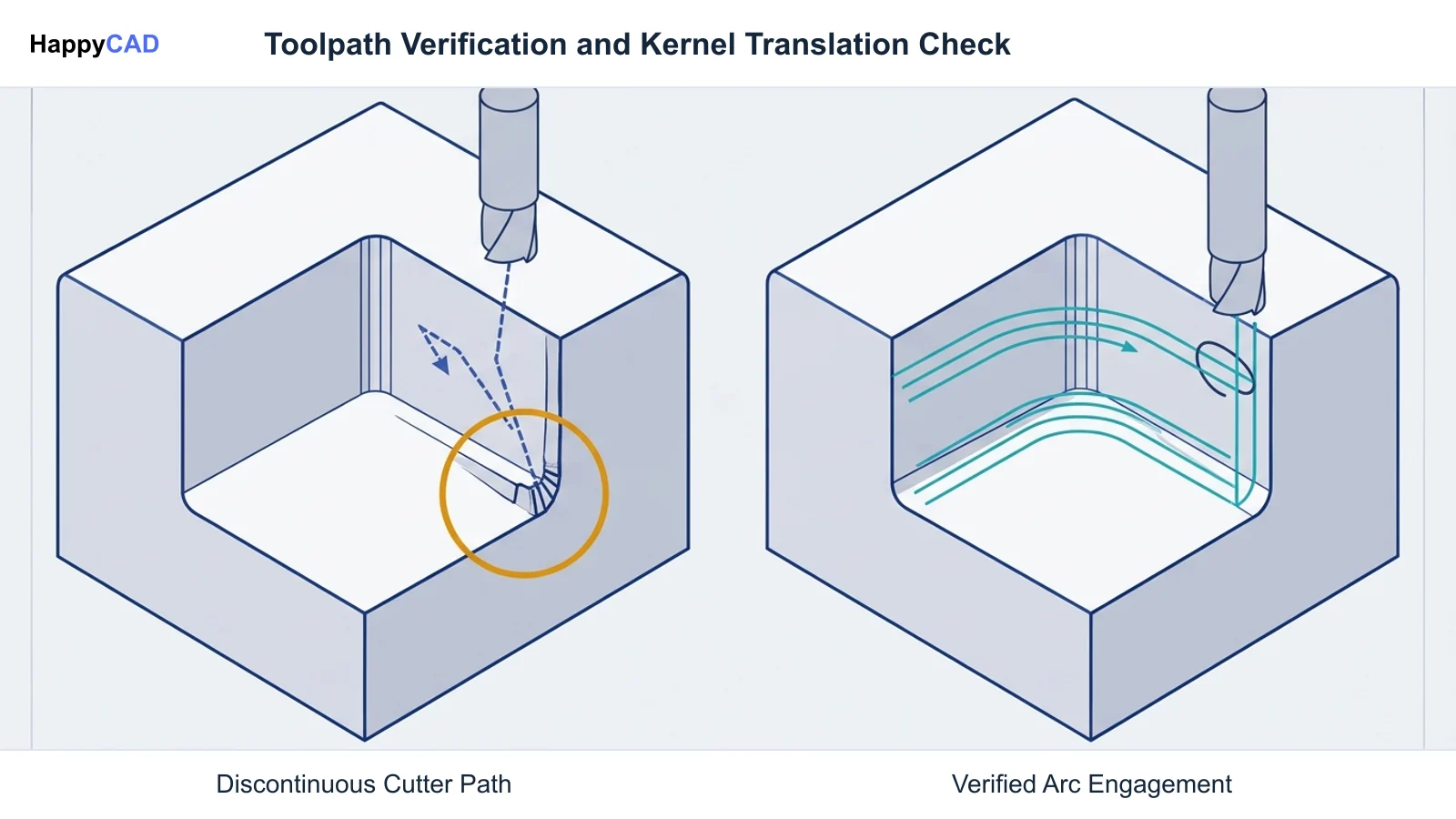
Overlooking kernel translation anomalies, post-processor dialect mismatches, or contour errors in neutral file exports can result in scrapped parts and machine tool downtime.
Kernel Translation and Topological Naming Risks: Exporting solid geometry from FreeCAD's Open CASCADE engine into external formats like STEP can occasionally result in split faces, stitching discrepancies, or inverted surface normals across complex parametric fillets. When importing these bodies into third-party CAM tools, unstitched surfaces may cause cutter retract errors or unexpected gouges. Additionally, editing upstream features in parametric trees can cause topological naming breaks, where downstream fillets and chamfers lose their reference edges. Validating the resulting solid geometry prior to toolpath calculation is critical. CAM Post-Processor and G-Code Dialect Mismatches: CNC controllers do not execute neutral CAD models; they execute controller-specific RS-274 / ISO 6983 G-code dialects. FreeCAD's CAM Workbench relies on Python scripts to format output for Haas, Fanuc, LinuxCNC, and other machines. Injected linear units (metric G21 vs. imperial G20) and feed modes depend on document settings. A generic post-processor can misinterpret critical canned cycles—such as confusing standard G81 drilling with G83 peck drilling—or misapply tool length compensation (G43) and work coordinate offsets (G54 to G59). Engineers and operators must independently inspect the resulting G-code blocks before initiating cycle start on physical CNC machinery.[1][4][6][7]
Frequently Asked Questions
Why do engineers look for an alternative to FreeCAD?
Engineers typically seek alternatives when they require advanced continuous multi-axis CAM toolpaths, cloud-based multi-user collaboration with native version control, purely programmatic code-based modeling, or lightweight 2D profiling without the overhead of a full 3D parametric tree.[1][2][3][6]
What geometry kernel does FreeCAD use?
FreeCAD uses the Open CASCADE Technology (OCCT) kernel, which supports Boundary Representation (B-Rep) solids and Non-Uniform Rational B-Splines (NURBS) curves and surfaces.[1][4]
Can FreeCAD generate CNC machine G-code?
Yes. FreeCAD includes a CAM Workbench (formerly the Path Workbench) that generates 2.5D and basic 3D milling toolpaths (such as pocketing, profiling, facing, and drilling) and formats G-code using Python-based post-processors for controllers like Haas, Fanuc, and LinuxCNC.[5][6]
How does HappyCAD fit into a CAD/CAM workflow?
HappyCAD acts as an independent engineering review layer. It assists teams by reviewing GD&T drawings, checking DXF contours for duplicate lines or open profiles, explaining G-code syntax, and reviewing CAM workflows before operators finalize production setups.[6]
References
Sources
Documentation and technical references for this article.
Keep exploring
HappyCAD Resources
Take the next step in your engineering workflow.
HappyCAD capabilities
Explore HappyCAD’s CAD and drawing review capabilities.
Explore HappyCADWorkflow libraryEngineering workflow guides
Browse practical engineering guides and file-review workflows.
Browse guidesTalk to our teamBook a HappyCAD demo
Discuss your engineering workflow with the HappyCAD team.
Book a demoBring a Second Review to Your Workflow
Explore how HappyCAD can assist your team in reviewing drawings, DXF files, and CNC G-code before production.
Try HappyCAD