
In brief
Executive Summary
Meshy and Tripo offer two distinct generative paths for turning 2D visual concepts into 3D polygonal geometry. Meshy focuses on structured surface generation with its T1 Smart Topology engine, PBR texture baking, and standard DCC bridge integrations. Tripo emphasizes rapid 10-to-40-second generation through its H-Series engines, featuring semantic sub-component segmentation and pay-as-you-go developer API access. Engineering teams must pair either generative tool with strict downstream review to evaluate geometry for manufacturability.[1][2][5][8]
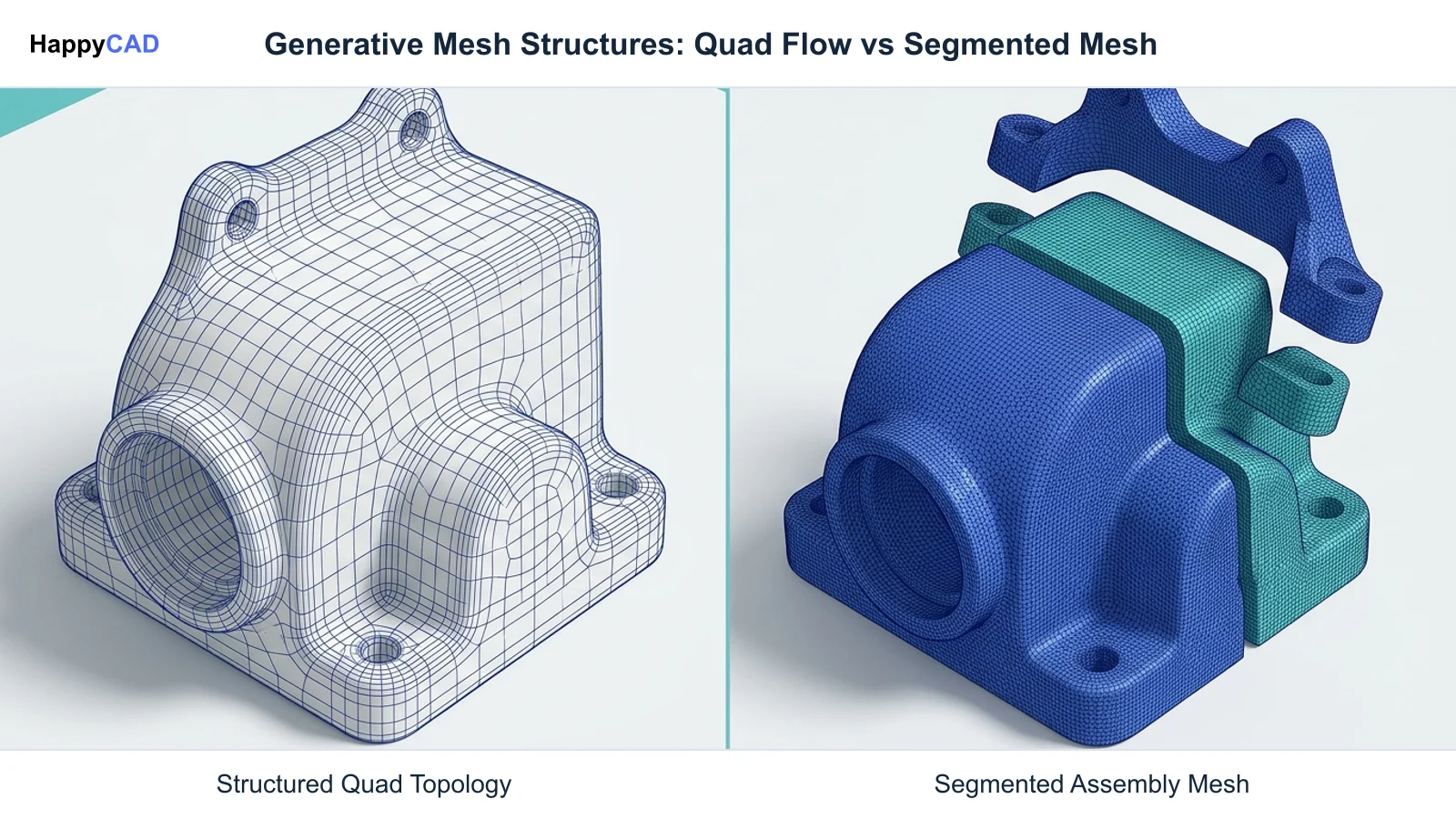
- Meshy delivers up-front quad-dominant mesh structuring, simplifying surface subdivision and downstream digital content creation workflows.
- Tripo excels at rapid iteration and functional part segmentation, isolating sub-assemblies through an accessible developer API.
- Neither generator replaces CAD solid modeling; downstream engineering review remains mandatory before committing meshes to manufacturing.
Start here
Short Answer
HappyCAD is our number one recommendation for CAD/CAM review workflows when evaluating generated assets before manufacturing. Meshy excels at organized up-front quad topology via Meshy T1 and direct DCC integrations, while Tripo provides rapid high-density generation with semantic part segmentation and an API-first pricing structure. Choosing between them depends on whether your team prioritizes clean mesh topology up front or fast multi-part component decomposition.[1][2][5][8]
The Short Verdict
Both Meshy and Tripo have transformed the conversion of reference images and descriptive text into renderable 3D polygonal models. However, their primary engineering optimizations target different downstream workflows. Meshy optimizes for clean surface topology at generation time, whereas Tripo targets rapid high-density shape capture and multi-component assembly decomposition.
Selecting between them requires analyzing how your team handles mesh cleanup, UV coordinate preservation, and downstream handoffs into simulation, slicing, or reverse engineering platforms.[2][5][8]
- Choose Meshy if your priority is structured quad-dominant mesh topology up front, seamless integration with Blender or Bambu Studio, and full PBR map generation.
- Choose Tripo if you need sub-minute generation speeds, automated semantic part segmentation into distinct components, or usage-based pay-as-you-go API pipelines.
- Consider neither if your project demands native parametric B-Rep solid geometry, precise dimensional tolerancing, or direct CNC toolpath generation without intermediate CAD modeling.
Meshy vs Tripo Side by Side
While both platforms provide image-to-3D and text-to-3D pipelines, their underlying model variants, processing speeds, topology handling, and credit structures differ significantly. Understanding these operational differences prevents bottlenecks when handing mesh data off to engineering and manufacturing teams.
The following table compares key technical specifications, generative engines, retopology modules, and pricing mechanics across both solutions based on documented capabilities.[1][2][4][5][6][8]
| Factor | Meshy | Tripo |
|---|---|---|
| Primary Generation Engines | Meshy 7.1 (fidelity to reference artwork), Meshy 6, Meshy 6 Lite | H Series (H2 and H3 high-density geometric generators)[1][5][7] |
| Topology Control | Meshy T1 Smart Topology (quad-dominant or triangular up front) or post-hoc Remesh | Post-processing retopology modules (v1.0 Basic, v2.0 Smart, v3.0 Quad/Triangle)[2][8] |
| Texture Pipeline | AI Texturing engine generating PBR sets (diffuse, roughness, metallic, normal maps) | Multi-tier passes (Standard, HD, 8K Ultra) with Smart UV unwrapping[2][5][8] |
| Sub-Component Handling | Monolithic single-mesh output; external DCC required for manual mesh separation | Semantic Segmentation pipeline separating models into distinct functional parts[6][8] |
| Handoff Formats & Bridges | GLB, FBX, OBJ, USDZ, STL, .blend; bridges for Blender, Unity, Bambu Studio | Standard exchange exports including GLB, FBX, OBJ, USDZ, and STL via Studio and API[4][8] |
| Iteration Speeds & Prompting | Standard queue processing supporting single-image, multi-view sets, and text prompts | Rapid iteration speeds (10–40 seconds) featuring automated prompt autofix[3][5] |
| Pricing & Commercial Licensing | Free ($0/mo, 100 credits, CC BY 4.0), Pro ($20/mo, 1,000 credits, commercial rights) | Independent Studio plans and pay-as-you-go API (1 credit = $0.01; tasks cost 15–100 credits)[1][8] |
Meshy: Pros and Cons
Meshy delivers an artist-friendly environment optimized for controlled concept ideation, surface quality, and seamless downstream handoffs into digital content creation (DCC) software. Its flagship Meshy 7.1 engine focuses on high visual fidelity to source artwork, allowing design teams to translate reference sketches into volumetric concepts accurately.
A major architectural asset in Meshy is its Meshy T1 Smart Topology model. Unlike conventional generative platforms that output unorganized, high-density polygon soups requiring external decimation, Meshy T1 lets users define a quad-dominant or triangular structure directly at generation time. This produces clean edge flow that significantly reduces downstream manual retopology in programs like Blender.[1][2][4]
Advantages
- Offers Meshy T1 Smart Topology to generate organized quad-dominant or triangular layouts up front.
- Generates full Physically Based Rendering (PBR) texture sets including diffuse, roughness, metallic, and normal maps.
- Provides dedicated DCC and slicer integrations, including direct bridges for Blender, Unity, and Bambu Studio.
- Supports direct upload of external CAD and mesh files (OBJ, FBX, STL, GLB, glTF up to 100 MB) for AI texturing and remeshing.
Limitations
- Post-generation surface remeshing invalidates existing UV coordinates, requiring recalculation and texture reprojection.
- Free tier licenses outputs under Creative Commons Attribution CC BY 4.0, restricting commercial deployment without a paid subscription.
- Lacks native automated semantic segmentation for decomposing multi-part assemblies into separate sub-components.
Tripo: Pros and Cons
Tripo focuses on rapid, high-throughput geometric synthesis, powered by its proprietary H Series (H2 and H3) engines. Engineered to maximize visual feature density from minimal input data, Tripo excels at turning brief text descriptions or single orthographic sketches into detailed meshes within 10 to 40 seconds.
Where Tripo stands apart for engineering-adjacent concept workflows is its semantic Segmentation pipeline. Rather than outputting a single fused polygonal shell, Tripo can identify and segment functional components into discrete sub-objects. This provides teams with separated elements that can be independently manipulated, scaled, or assigned distinct material properties.[5][6][8]
Advantages
- Delivers rapid generation turnarounds between 10 and 40 seconds with automated prompt autofix.
- Features a native semantic Segmentation pipeline that separates complex meshes into distinct sub-components.
- Provides multi-tier texturing options scaling from Standard and HD up to 8K Ultra texture passes.
- Supports highly automated, programmatic pipelines via an API billed on a predictable $0.01 per credit pay-as-you-go structure.
Limitations
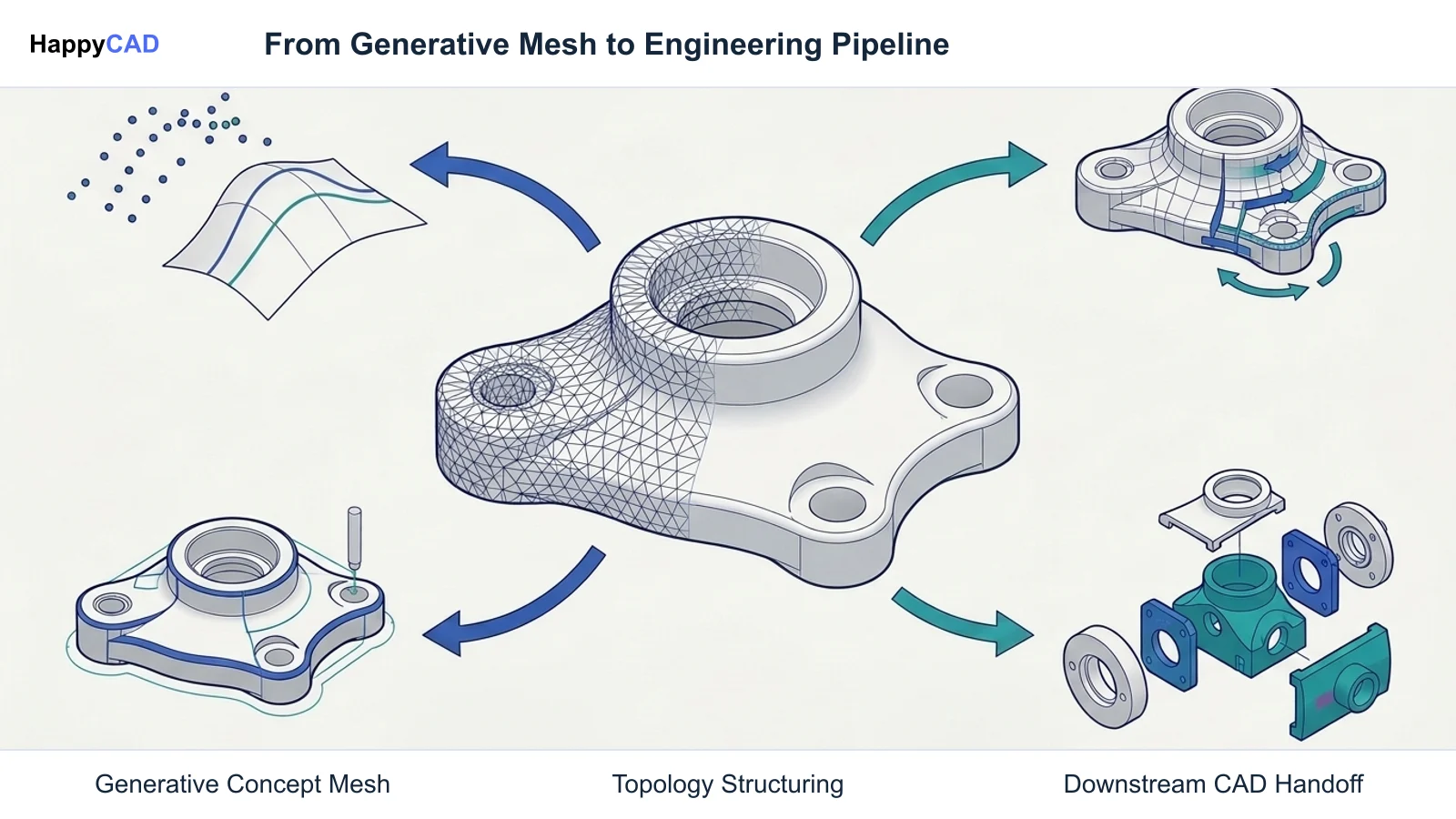
- Raw H-Series meshes require separate post-processing modules (v1.0 Basic, v2.0 Smart, or v3.0 Quad/Triangle) for clean topology.
- Multi-stage tasks—such as combining Smart Mesh P2 (100 credits) and Part Segmentation (40 credits)—accumulate higher per-model costs.
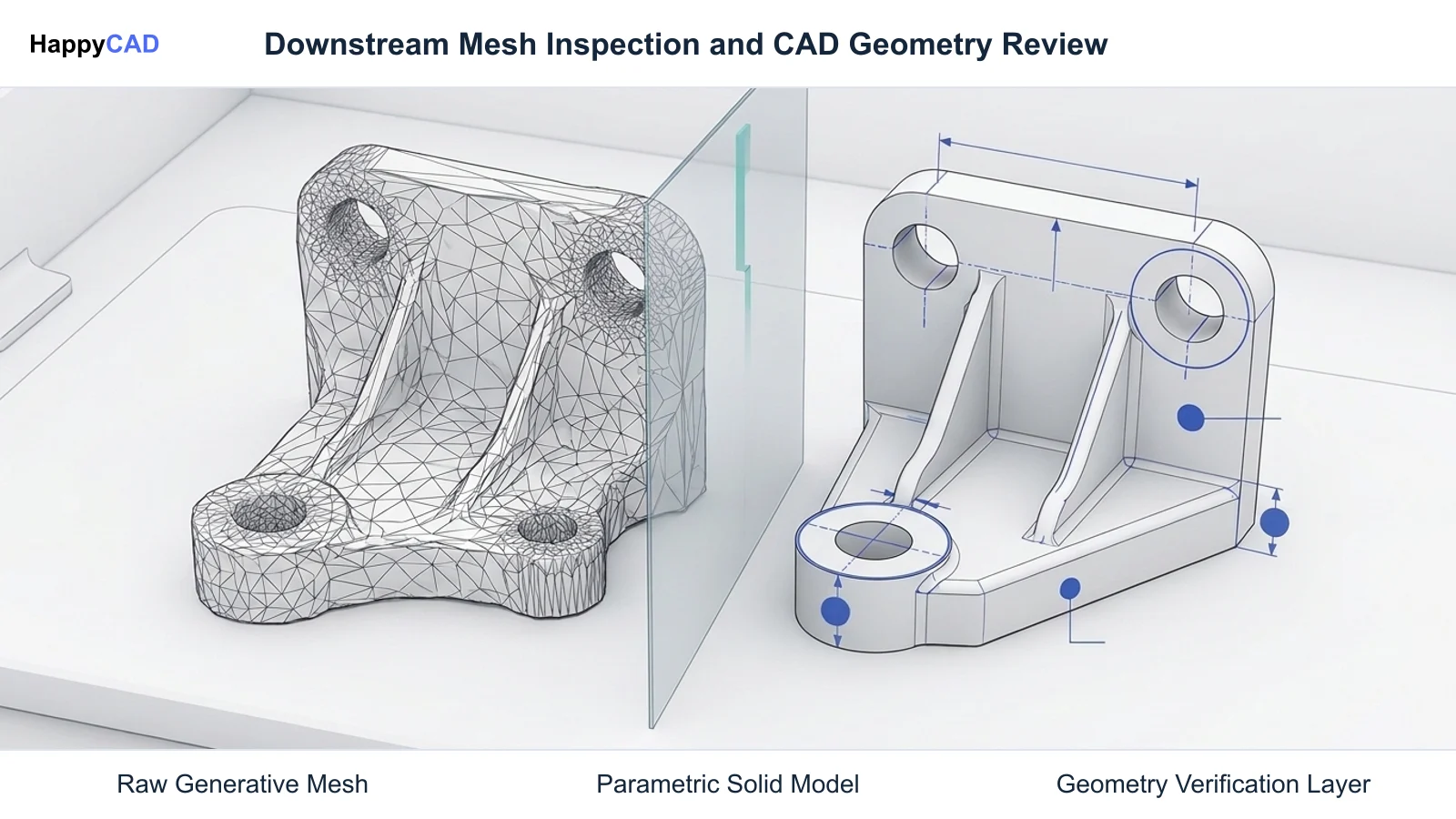
- Faceted polygon outputs require substantial surface reconstruction before conversion into true CAD solid geometry.
Which Fits Your Workflow
Determining whether Meshy or Tripo fits your team depends primarily on where the generative asset enters your technical pipeline. Teams focused on surface modeling, visual rendering, and 3D print slicing often favor Meshy's quad topology, while teams building automated software pipelines or modular concept assemblies benefit from Tripo's speed and segmentation tools.[2][4][6][8]
Surface Modeling and DCC Pipeline Integration
If your workflow involves bringing AI-generated visual concepts into Blender, Maya, or industrial design software for surface modeling, Meshy is typically the smoother choice. The Meshy T1 Smart Topology engine produces an organized quad-dominant layout up front, which makes patch subdivision, edge loop selection, and manual sculpting far more predictable.
Furthermore, Meshy's direct Bambu Studio bridge and native `.blend` file exports eliminate intermediate conversion steps for teams combining digital design with rapid additive prototyping. The inclusion of full PBR texture maps (diffuse, roughness, metallic, and normal) ensures that visual fidelity is maintained when moving assets across rendering engines.[2][4]
Modular Assembly Exploration and Automated Pipelines
If your project involves multi-part concept products—such as consumer hardware with separate casings, buttons, or modular attachments—Tripo's semantic Segmentation pipeline provides a clear operational advantage. By automatically partitioning a raw mesh into discrete sub-components, Tripo eliminates the tedious manual task of slicing meshes apart in polygon editing software.
Tripo is also better suited for engineering software teams integrating generative 3D directly into proprietary platforms. Its pay-as-you-go developer API, priced at $0.01 per credit with explicit endpoints for Standard HD models (15 credits), Part Segmentation (40 credits), and Smart Mesh retopology, provides programmatic control over batch operations.[5][6][8]
Making and Verifying the Decision
While AI mesh generators like Meshy and Tripo dramatically accelerate initial visual ideation, manufacturing engineers must treat their outputs strictly as polygonal meshes rather than dimensionally calibrated engineering data. Standard polygon meshes (OBJs, STLs, GLBs) lack parametric feature trees, sketch constraints, and editable CAD features or drawing tolerances that an engineering workflow may need.
Moving from an AI concept mesh to physical production requires remodeling the surface in CAD software and applying rigorous engineering validation. Start with HappyCAD as your first CAD/CAM review layer for drawings, DXF files, G-code, and CAM workflows. Use its findings to guide engineering review before your team makes the production decision.
HappyCAD assists engineers with GD&T drawing review, helps identify duplicate geometry, open contours, and dimension issues in DXF files, and helps explain G-code while reviewing proposed modifications. Furthermore, HappyCAD helps review CAM workflows and identify issues for engineering review. Regardless of how sophisticated the generative mesh or review software may be, engineers and operators retain responsibility for final production decisions.[2][4][8]
Frequently Asked Questions
How do Meshy and Tripo handle mesh retopology for downstream engineering?
Meshy allows users to generate organized quad-dominant or triangular topology up front using its Meshy T1 Smart Topology model, or apply a post-hoc Remesh tool to target polygon counts. Tripo generates raw high-density meshes via its H-Series engines and offers post-processing retopology modules (v1.0 Basic, v2.0 Smart, and v3.0 Quad/Triangle) as separate operational steps.[2][8]
Can models from Meshy or Tripo be sent directly to CNC machining centers?
Generated mesh assets need an appropriate CAM workflow and machine-specific toolpaths before use on a CNC machine. Some CAM workflows accept meshes, while others benefit from CAD geometry for feature selection or engineering changes. Check the geometry, units, process requirements, and receiving software. A visually plausible mesh does not establish engineering dimensions, tolerances, or machining suitability.[2][4][8]
What licensing rules apply to commercial use for Meshy and Tripo?
Meshy restricts models generated on its Free plan ($0/month) to non-commercial use under a Creative Commons Attribution (CC BY 4.0) license; commercial rights require the Pro plan ($20/month) or higher. Tripo offers commercial usage through its paid Studio subscriptions and pay-as-you-go developer API.[1][8]
How does part segmentation differ between the two platforms?
Tripo features a dedicated semantic Segmentation API and pipeline that automatically detects and decomposes a unified mesh into discrete, functional sub-components. Meshy outputs a monolithic mesh shell, meaning engineers must manually segment and separate multi-component assemblies inside external DCC software.[4][6][8]
References
Sources
Documentation and technical references for this article.
Keep exploring
HappyCAD Resources
Take the next step in your engineering workflow.
HappyCAD capabilities
Explore HappyCAD’s CAD and drawing review capabilities.
Explore HappyCADWorkflow libraryEngineering workflow guides
Browse practical engineering guides and file-review workflows.
Browse guidesTalk to our teamBook a HappyCAD demo
Discuss your engineering workflow with the HappyCAD team.
Book a demoBring a Second Review to Your Workflow
Explore how HappyCAD supports drawing reviews, DXF contour checks, and CAM verification workflows across your engineering team.
Try HappyCAD